The folks over at the Mozilla Digital Memory Bank kindly took the time to interview me last November. I just noticed that the interview transcript has been posted online last month.
Month: June 2008
Firefox 3 and Hotmail Incompatibility?
I tried to log into my Hotmail account today with Firefox 3.0, and I got the following error:
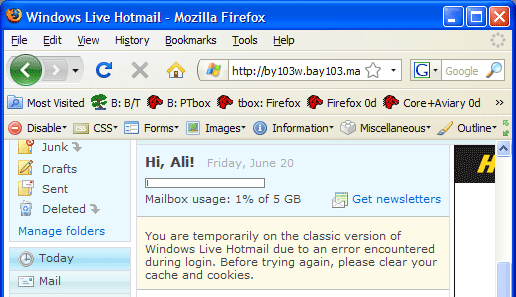
Clearing the cookies and cache doesn’t help. When I log in via IE7, it works fine. This problem started to happen after the upgrade to Firefox 3.
Firefox 3.0 Released
After a lot of hard work by the Mozilla team and tons of volunteers, Firefox 3.0 has been released. Help set the Guinness World Records for downloads by downloading today.
Personally, my favourite new feature is the AwesomeBar. What’s yours?
Google Groups and FeedDemon Woes
I’ve been having a couple of issues recently with a Google Groups hosted list that I manage, for which no solutions seem to be available.
Issue #1 – Google Groups Atom Feed id and link attribute broken
I’ve detailed this issue more in my post to the Is Something Broken forum on the Google Groups website, but so far there’s no resolution. Basically the Atom feeds generated by Google Groups generate a id and link attribute that contains a relative link without an FQDN so that when viewed from an RSS reader, the links are broken because the RSS reader passes a URL without an FQDN to the web browser. I hope this gets fixed as it seems like a pretty major problem.
When viewed from Firefox’s Live Bookmarks it works fine, but not otherwise.
The RSS 2.0 feed generated by Google Groups does have an FQDN in the link attribute so it works properly. The “obvious” solution (other than fixing the issue, which is up to Google) is to use the RSS 2.0 feed instead of the Atom feed but that creates another problem.
UPDATE (18/06/2008): As of today, Google seems to have fixed the issue with the Atom feeds.
Issue #2 – FeedDemon 2.7 does not handle the pubDate in the RSS 2.0 feeds correctly
The pubDates in the RSS 2.0 feed seem to be generated correctly, like the following:
<pubDate>Fri, 06 Jun 2008 00:02:27 UT</pubDate>
When the RSS 2.0 feed is added to FeedDemon in synced mode (where it syncs with the Newsgator servers), it seems to ignore the pubDate and pick some arbitrary date for all the entries, and all the entries share this same date.
When the RSS 2.0 feed is added in non-synced mode (where FeedDemon pulls from the feed server directly), all the pubDates are respected and it works properly. In Firefox Live Bookmarks it works properly too.
With the Atom 1.0 feed from Google, the dates are correct in all cases but the links are broken. But at the moment users are in a quandry as there appear to be problems in both Google’s feed implementation and FeedDemon’s parsing of Google’s feeds.
UPDATE (08/06/2008): Nick Bradbury, the creator of FeedDemon has been able to reproduce the bug and has added it to the FeedDemon bug tracking database.
Guest Internet Access via FON Routers
A couple of weeks ago I was talking to Yusuf about setting up wireless internet access at my workplace for guests. In the past we had them plug into our wired network, but the downside of this is that unless you have very expensive DNAC equipment like InfoExpress, or have static NAC configured (very cumbersome), your guests are clients on your main office network and can wreak havoc if their computers have viruses or are otherwise exploited.
Network infection via guests is a real vector and one of which companies should be very afraid. Ideally guests would always be on a separate VLAN.
One way to acheive this is to use a FON router to sandbox guests into a separate VLAN. The FON routers have two SSIDs, a private one that is WPA2 protected that gives full access to the local network, and a public SSID that is (by default) completely separate from the main network and guests on this VLAN cannot talk to computers on the main network, only through to internet IP addresses.
Using the friends and family feature of FON, you can set up a custom username and password that your office guests can use to authenticate on the public SSID (multiple logins with a single credential is possible).
This kills two birds with one stone because you not only have secure access to your own network via WPA2 (which is generally considered to be unbreakable using today’s technology) and you offer guests wifi access to the internet without allowing them access to your internal network.
A couple of things are on my FON wishlist:
- Seamless handover between FON access points on both public and private SSID
- Proper resolution of NetBIOS names on the private SSID (even though its on a different subnet from the main network)
- Better tolerance for old network drivers (this is a big one because in quite a few cases clients using older drivers could not connect to FON even though they could use other wifi networks – older Intel drivers in particular seem to be a problem)
- More powerful customisation options for the FON portal
- On the La Fonera+, allow the extra wired ethernet port to optionally connect to the public FON network instead of the private network
One other thing to bear in mind is that if you choose this solution, you allow anybody to use your bandwidth when authenticated through the FON network. Depending on your corporate policies, this may or may not be a problem for you. If bandwidth is the only issue, on the public SSID you can optionally limit this to as little as 512Kbps to make sure that guests don’t hog your pipeline.
ATI Mobility Radeon Drivers from Dell
A couple of days ago I wrote about some headaches upgrading to Windows XP SP3. This was related to my ability to rotate my screen being scuttled by the SP3 update. Microsoft said I needed a driver update to restore this functionality but Dell did not seem to provide one, so I tried to get some publicly available drivers from the ATI website which didn’t work for me, because they didn’t contain any definitions for the Mobility Radeon series, only the desktop versions. This meant that although my monitor rotation worked, I couldn’t get my LCD to display at the native 1400×1050 resolution that it usually displays at, which was a deal breaker and I had to revert to SP2 and install the Windows Service Pack Blocker Tool Kit to stop it from automatically upgrading again.
A couple of comments later, people pointed out that the problem is really Dell’s rather than Microsoft’s because Dell hadn’t bothered to release a driver update in years despite ATI continually updating their reference drivers. What’s worse, Dell has a deal with ATI where Dell users can’t download drivers directly from the ATI website. So users are supposedly stuck with the broken old Dell drivers that Dell couldn’t be bothered to update.
I did some researching on the Dell forums and found two entries that gave me the correct information so that I could find drivers that worked with SP3, even though they were unsupported by Dell. There is a “hidden” link on the ATI website that allows you to download the drivers for Mobility Radeon series bypassing the compatibility check that usually stops Dell users from accessing the drivers:
http://www.ati.com/online/mobilecatalyst/
After I got the drivers from this site, everything worked like a charm and I was able to use my video card rotation function correctly with SP3. One small gotcha regarding the latest ATI drivers is that you must have the Microsoft .NET Framework Version 2.0 installed in order to use them.
All of this would have been a lot simpler if Dell just kept their drivers up to date! I have a Dell Latitude D610, which is widely deployed at enterprises worldwide. It’s surprising that their enterprise customers haven’t made a bigger fuss about this.